Blog
Seven Simultaneous Interpretation Tools Compared: A 2026 Buying Guide for Meetings
Language can be a major barrier when meeting with people from different countries. Fortunately, there are now many tools for simultaneous interpretation. This guide takes a close look at several widely used meeting interpretation tools across multiple dimensions.
Some meeting platforms have built-in translation, but the organizer often has to pay for a qualifying subscription. Another type of tool lets you pay for one service and use it with most meeting platforms, without requiring the other party to install anything. That is the type this guide primarily compares.
What matters most when translating a live meeting? Accuracy comes first. Thanks to advances in technology, it is no longer such an obvious bottleneck. Alongside accuracy, this comparison looks at latency, voice cloning, and other factors.
Latency is particularly important. When interpretation takes more than ten seconds to arrive, a conversation can turn into a cycle of saying one thing and then waiting. It feels frustrating.
We compare ParleyVoice, Transync AI, Palabra, Maestra Live, JotMe, Wordly, and iFlytek Simultaneous Interpretation. Translation performance is based on public test records, and features, language coverage, and pricing are based on official materials. The information may contain inaccuracies, so try the tools yourself before choosing. Full test report
1. The short answer: Who is each tool for?
For two-way voice conversations, our first choice is ParleyVoice. If you hold meetings frequently and want to spend less, Transync AI is a better fit. For multilingual events, focus on Wordly, Palabra, and Maestra Live.
The star ratings are for individuals and small teams holding online voice meetings. They consider translation content, wait times, features, and cost. See “How the recommendation ratings are calculated” in the appendix for the method and category scores for all seven tools.
The wait times below measure from the moment someone starts speaking to the moment the corresponding translated audio starts playing in the recording. They do not measure how long it takes to finish translating the sentence or how long it takes a remote Zoom participant to hear it. The numbers come from a limited set of recordings under different settings and describe these tests, not every meeting.
ParleyVoice | ★★★★½ 4.5/5: Our first choice if conversation quality matters most
ParleyVoice’s main advantages are the lowest interpretation latency, low-latency two-way conversation, and the ability to hear how your own speech was translated. It uses newer large language models, including Qwen Live and Doubao, for end-to-end speech translation. In the latest Qwen Live recording adopted by the report, English audio began about 3.8 seconds after the speaker started speaking Chinese on the first run. That was the shortest first-run audio wait among the representative normal-condition recordings for the seven tools, and all five key facts were translated correctly. ParleyVoice also supports real-time voice cloning, self-monitoring, RTC (real-time audio and video communication), and global access nodes. The Qwen model supports 60 spoken input languages and 29 spoken output languages. Qwen test · Features · Languages · RTC
Doubao mode was also tested with short phrases. After the Chinese greeting for “hello,” the English “Hello” began playing in about 1.7 seconds. In another example, an English translation of a question about a meeting time began in about 3.4 seconds. These examples give a sense of the wait for short exchanges; the sub-two-second result was also the shortest delay observed in the current tests. Supplementary Doubao short-phrase tests
Qwen costs USD 4.20 per hour and Doubao costs USD 8.88 per hour. You pay for what you use, without a monthly subscription, and two-way interpretation is billed only once. It costs more than Transync AI’s low-cost subscription but has a lower hourly rate than the Palabra meeting plans, JotMe Fast voice plan, and Wordly starter package covered here. If you hold many hours of meetings every month, Transync costs less. If you care more about smooth conversation, need self-monitoring and voice cloning, and don’t want to start with a monthly subscription, ParleyVoice is the better tool to try first. Pricing
Transync AI | ★★★★☆ 4/5: Attractive pricing for frequent monthly use
Transync AI’s advantage is straightforward: it’s inexpensive and includes captions, voice translation, voice cloning, and meeting summaries. The international personal plan costs USD 8.99 per month for 10 hours, or about USD 0.90 per hour if fully used. The China plan costs CNY 39 per month for 10 hours, or CNY 3.90 per hour if fully used. All five key facts were preserved in the normal-condition test. However, on the first run with cloning enabled, English audio started about 18.3 seconds after the speaker began. A later new session cut the wait to about 6.9 seconds. On first use, the captions may already be visible while listeners are still waiting more than ten seconds for audio. These are two different sessions, not an 18-second wait for every sentence. It’s worth considering if your monthly usage is steady; try listening to see whether the wait is acceptable before buying. Test · Features · International pricing · China pricing
Palabra | ★★★½ 3.5/5: Works for meetings and events, but costs more to get started as an individual
Palabra suits teams that need to handle both meetings and events. It offers two-way interpretation, voice cloning, browser-based listening for attendees, and an API for developers. All five key facts were preserved in the representative recording, but the translated audio did not start until about 14.8 seconds after the speaker began. You’ll need to allow for that wait in back-and-forth conversations. The Starter meeting plan costs USD 60 per month for 3 hours, or USD 20 per hour if fully used. Pro and Team bring the rates down to USD 15 and USD 10 per hour, respectively, but cost more per month. Its strength is versatility, not a low price. If you only occasionally need an hour with an overseas client, there’s no need to pay for hours you won’t use. Test · Meeting features · Plans
Maestra Live | ★★★½ 3.5/5: Good for captions, training, and sharing with an audience
Maestra Live runs in a browser and makes it easy to use captions, export records, and share with attendees. It also has an explicit echo cancellation switch. In this test, English captions appeared after about 3.7 seconds, but English audio took about 16 seconds to start. Reading captions and relying primarily on audio are noticeably different experiences. All five key facts were ultimately preserved. The Meetings plan costs USD 49 per user per month, which works out to USD 4.90 per hour at 10 hours a month. Each session is limited to 75 minutes. More usage spreads the monthly cost, but one hour still costs USD 49. It’s worth a look for classes, training, and meetings that need written records; for rapid spoken Q&A, factor in the wait for audio. Test · Features · Echo cancellation · Pricing
JotMe | ★★★½ 3.5/5: Plenty of note-taking and text tools, but double-check monetary amounts
JotMe combines captions, meeting notes, and standalone text translation, making it useful for people who need to organize material after meetings. It starts playing audio fairly quickly; in the first test, English audio began after about 5.1 seconds. But the normal-condition test turned “CNY 30,000” into “CNY 130,000,” and “not CNY 130,000” into “not CNY 1,300,000.” For quotes and budgets, that matters more than waiting a few extra seconds. Premium costs USD 30 per month, and Fast voice mode uses credits at 5× the normal rate, or about USD 18 per voice hour if the plan is fully used. It makes more sense as a meeting-notes and text tool than as a cheap voice translation service based on the monthly fee alone. Test · Features · Pricing · Usage limits
Wordly | ★★★☆☆ 3/5: Better for multilingual events than personal calls
Wordly is geared toward event organizers. Attendees scan a QR code or open a link, then choose a language, listen to the interpretation, and read captions. Its value is in delivering one speaker’s remarks to an audience that speaks multiple languages, not just translating for two people. In the two baseline recordings, English captions appeared in about 2.2–2.4 seconds and audio started in about 15.1–16.0 seconds. All five key facts were preserved, though some wording was still ambiguous. The starter package is about USD 1,500 for 10 hours, or USD 150 per meeting hour, generally valid for 12 months. It’s hard to spread that cost over occasional personal meetings. For conferences, training, or multilingual events, evaluate it together with the services it provides for attendees. The 3-star rating is for small two-way meetings, not for its capabilities at events. Test · Product and plans
iFlytek Simultaneous Interpretation | ★★★½ 3.5/5: Worth a look for Chinese-language events and projected captions
iFlytek Simultaneous Interpretation is designed around the needs of Chinese-language events. Projected captions, live text corrections, transcript export, and translation sharing are all useful. All five key facts were preserved in the normal-condition test. Captions appeared in about 3 seconds, and English audio began in about 9.6 seconds. It’s worth considering for live captions and meeting support, but if you rely on voice for quick back-and-forth conversation, you’re still waiting nearly ten seconds. The official Quick Interpretation page lists CNY 0.8 per minute, or CNY 48 per hour. Prepaid time cards and enterprise plans are priced separately, so don’t treat this as the lowest price across all plans. Test · Features · Pricing page
2. In-depth comparison: What’s different in practice?
We compare latency, accuracy, performance on poor networks, and voice cloning.
1. Latency: How long after you start speaking can you hear the translation?
A four- or five-second wait for audio feels very different from a wait of more than ten seconds. In interviews, customer Q&A, and business discussions, both sides need to respond repeatedly, and delays can break their train of thought.
In the latest Shanghai-route recordings used here, ParleyVoice Qwen Live began playing English after about 3.8 seconds on the first run and about 5.0 seconds on repeat input. Both runs preserved all five facts checked for this passage. The full English audio finished in about 20.03 and 21.98 seconds, respectively, measured from the start of the Chinese speech in each run. A quick response, the ability to hear your own translated speech, and two-way translation are the main reasons it is our first choice for conversation. JotMe is also relatively fast, but its errors with amounts make it harder to recommend for business discussions. Qwen test
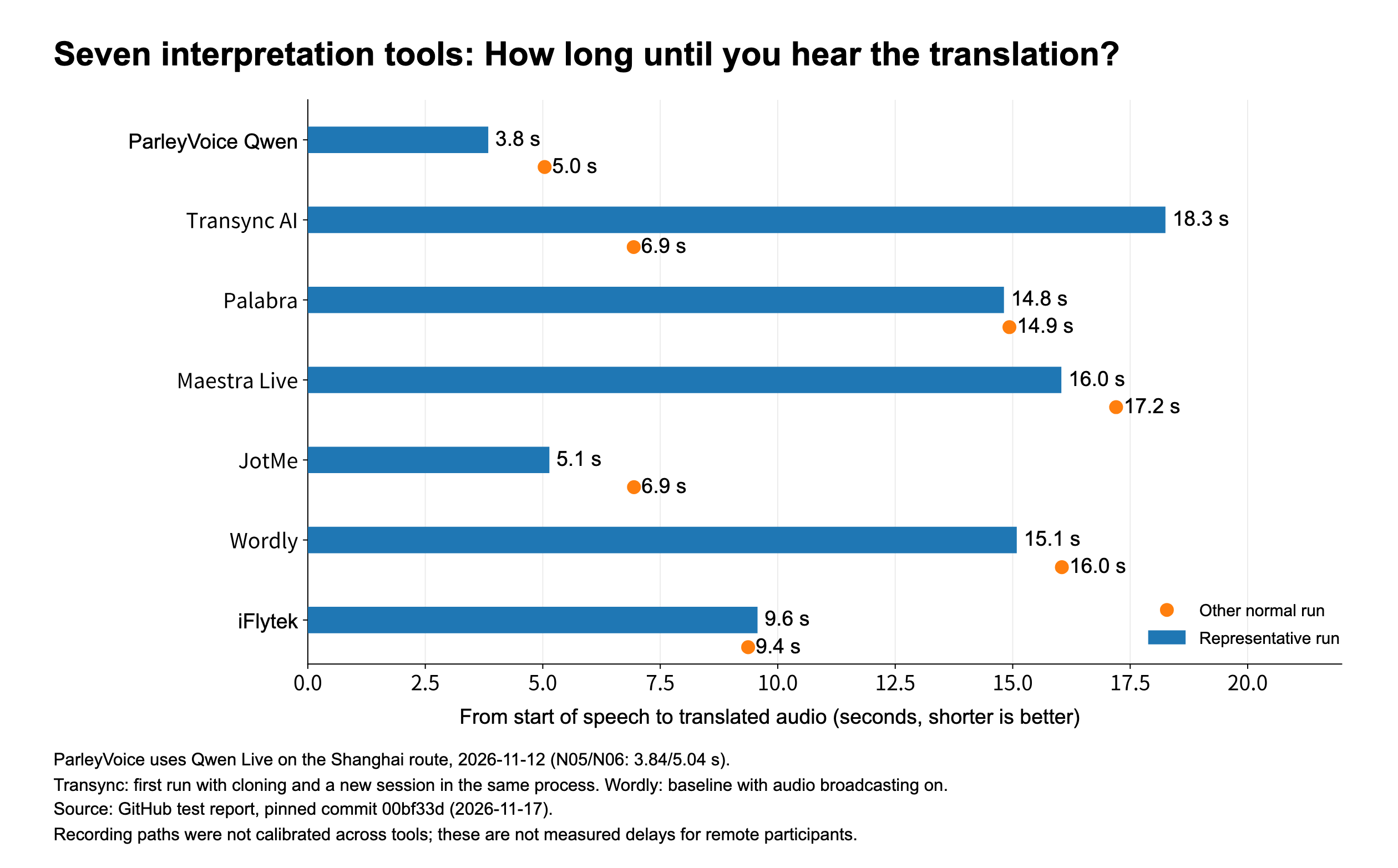
The bars and dots show two normal-condition recordings, not averages. ParleyVoice uses N05 and N06 from the November 12 Shanghai route. Transync’s first run and later new session are shown separately. Wordly uses a baseline with audio broadcasting already enabled. The different recording conditions have not been calibrated to a common standard.
| Tool | Time from the start of speech to translated audio | Time to first English captions | What it means in use |
|---|---|---|---|
| ParleyVoice Qwen Live (Shanghai) | First: 3.84 s; repeat: 5.04 s | First: 3.37 s; repeat: 4.51 s | Fastest first-run audio start; both runs preserved all five facts |
| Transync AI | First run with cloning: about 18.3 s; later new session: about 6.9 s | First: about 4.8 s | Audio takes a while on the first run, with a shorter wait later |
| Palabra | First: about 14.8 s; other normal-condition recording: about 14.9 s | First: about 14.3 s | Captions appear as a full block, and audio also takes more than ten seconds |
| Maestra Live | First: about 16.0 s; other normal-condition recording: about 17.2 s | First: about 3.7 s | Captions arrive well ahead of the audio |
| JotMe | First: about 5.1 s; repeat: about 6.9 s | First: about 3.9 s | Shorter wait for audio, but check monetary amounts |
| Wordly | Two baselines: about 15.1 s and 16.0 s | About 2.4 s and 2.2 s, respectively | Captions appear quickly; audio comes much later |
| iFlytek Simultaneous Interpretation | First: about 9.6 s; repeat: about 9.4 s | First: about 3.0 s | Reading captions saves several seconds compared with waiting for audio |
Among these representative normal-condition recordings for the seven tools, ParleyVoice Qwen Live had the shortest first-run wait for audio, while Wordly had the shortest wait for captions. These are different experiences: captions that appear very early may contain only a few words and be revised later. The comparison applies only to these recordings; it does not establish that any tool is fastest in every environment. Timing by run
The time the tool takes to get ready after you click “Start” is also different from the delay before translated audio plays. In one Transync recording, it took about 0.83 seconds from accepting the request to being ready. In the newer ParleyVoice recording, it took about 1.3 seconds to go from “Preparing audio” to “Listening.” Neither value is the time to hear the translation, and the measurements do not start at exactly the same point. There is no common measurement for task setup across the seven tools, so we do not rank them on it. Session setup records
Supplementary Doubao test: An English “Hello” in about 1.7 seconds
The supplementary Mac report compiled on November 16 contains two examples. In Example 01, the speaker simply says the Chinese equivalent of “Hello.” In Example 02, the speaker says “Hello,” pauses for about half a second, then asks, “What time does the meeting start this afternoon?” Each measurement starts when the corresponding Chinese utterance begins.
| Example and original utterance (translated from Chinese) | Time to hear English | Time to see English captions |
|---|---|---|
| Example 01: “Hello” | About 1.7 s | About 1.8 s |
| Example 02: “Hello” | Not confirmed; translated audio overlaps with the Chinese speech that follows | About 1.7 s |
| Example 02: “What time does the meeting start this afternoon?” | About 3.37 s | About 3.4 s |
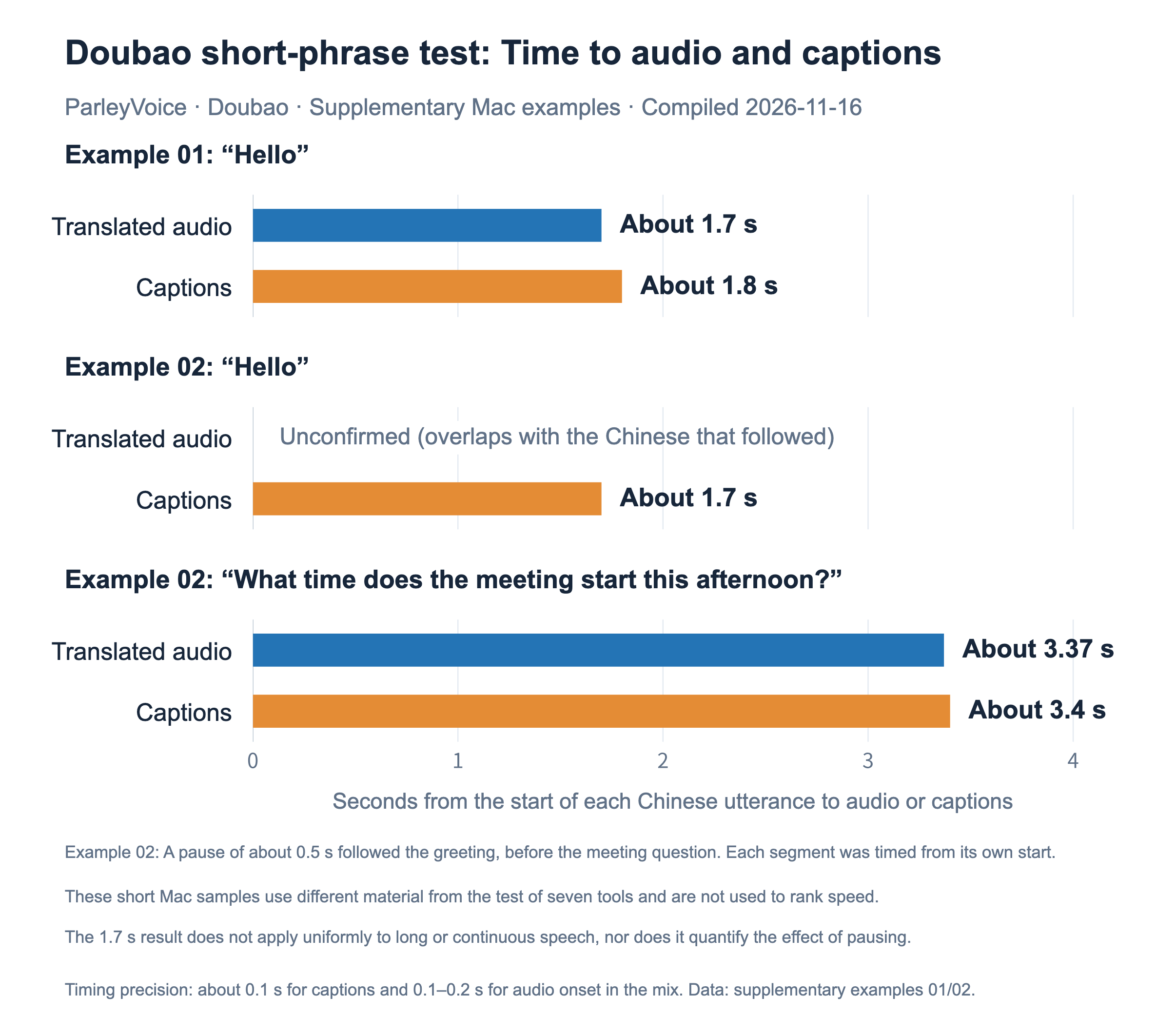
The shortest confirmed audio wait in these supplementary recordings was about 1.7 seconds in Example 01. In practice, that means you hear the English “Hello” about 1.7 seconds after you start saying the Chinese greeting. In Example 02, the later question about the meeting takes about 3.4 seconds. Don’t mistake the caption timing for the greeting for the audio delay of the question.
The samples do not compare the same utterance with and without a pause, so they cannot show whether pausing shortened the wait. They also use different test material from the common test of the seven tools. They are supplementary short-phrase examples and neither replace the formal Qwen Live results nor count toward the star ratings. Test notes and timestamps · Raw data
Play Example 01 · Play Example 02
Example 02 reuses the earlier Mac recording with a pause; it is not another independent test. The November 14 Doubao “Version 2” record is listed as historical data and is no longer used to judge which of the two current models is faster.
2. Accuracy: Start with the amounts, times, and conditions
The test used the following Chinese passage, translated here into English:
Please confirm the test results by 10 a.m. next Tuesday. The budget cap is CNY 30,000, not CNY 130,000. Release only if the test passes; if any problems are found, postpone the release until Friday.
The five facts to preserve were the action of confirming the results and its deadline, the CNY 30,000 budget cap, the clarification that it was not CNY 130,000, the condition that the test must pass before release, and the instruction to postpone until Friday if there were problems.
In the representative recordings, the ParleyVoice Qwen Live Shanghai retest, Transync AI, Palabra, Maestra Live, Wordly, and iFlytek Simultaneous Interpretation preserved all five facts. JotMe preserved three and got both monetary facts wrong. The Mac Doubao examples did not use the passage with the amounts, negation, and release conditions, so they are excluded from this five-fact check. Results by fact · Scope of the Doubao examples
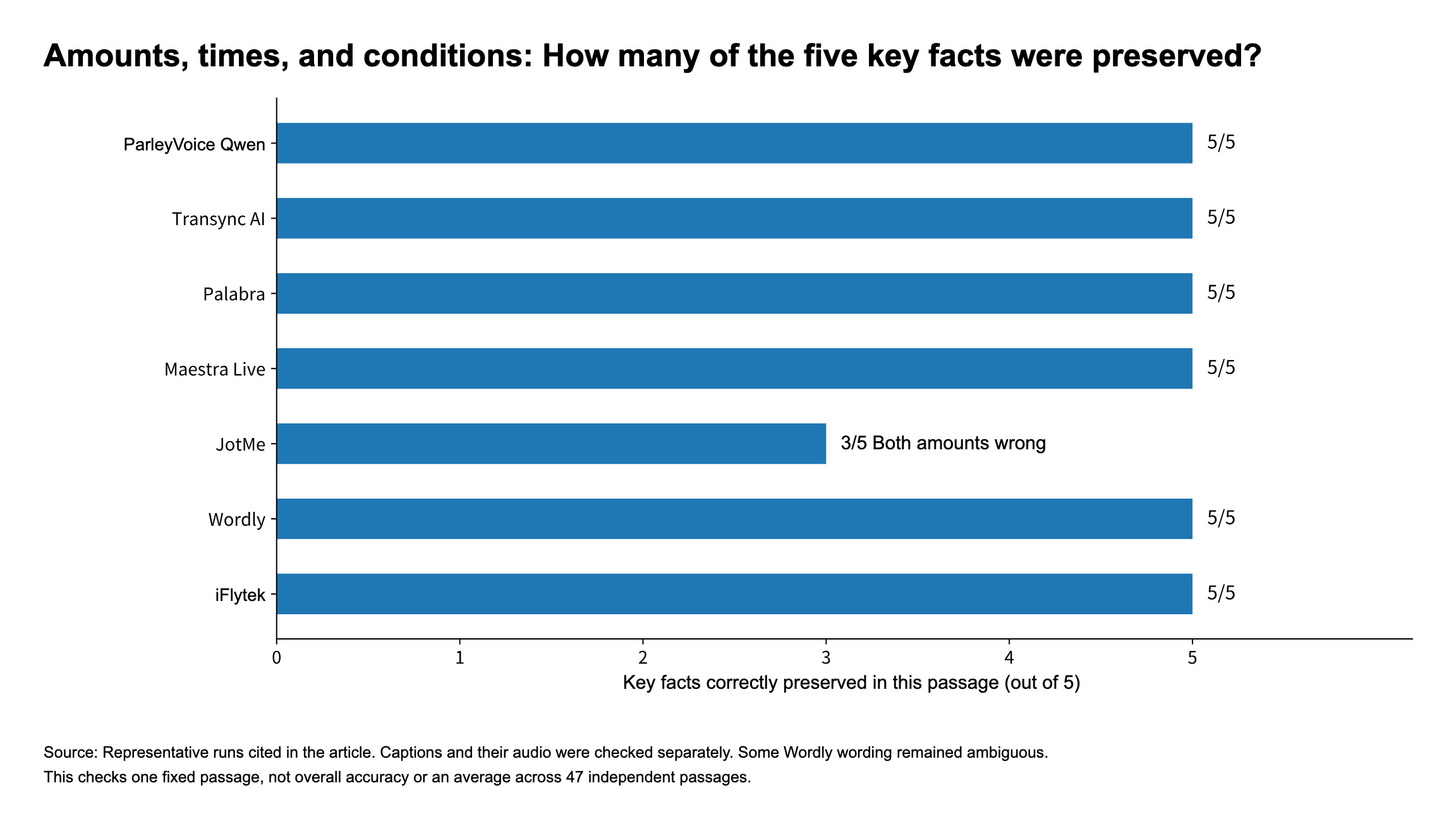
Six tools passed the check on the same short passage, so there was no single winner here. That does not mean they are equally accurate in every meeting. Wordly still had a wording problem: it rendered the thing to be “released” as “test.” The currency in another normal-condition Palabra recording has not been confirmed. Detailed judgments
JotMe’s error is easy to see: turning CNY 30,000 into CNY 130,000 changes the other party’s understanding of the budget. When trying a tool, include customer names, model numbers, amounts, and delivery dates in your test material and check that they are preserved. This tells you more than simply listening for fluent English. Original ParleyVoice captions · Original JotMe captions


In the historical ParleyVoice Doubao cloning run C01, “confirm the test results” was translated as “send the revised version,” and only three facts were fully preserved. That older record is still available. The present normal-condition comparison uses the Qwen Live Shanghai retest and does not pool results from different models or test material. Current tests and historical records
3. Poor network conditions: Can you keep listening when the connection is unstable?
The tests applied extra network latency, probabilistic packet loss, and an outage of about 10 seconds. First, let’s see whether the wait for audio changed noticeably:
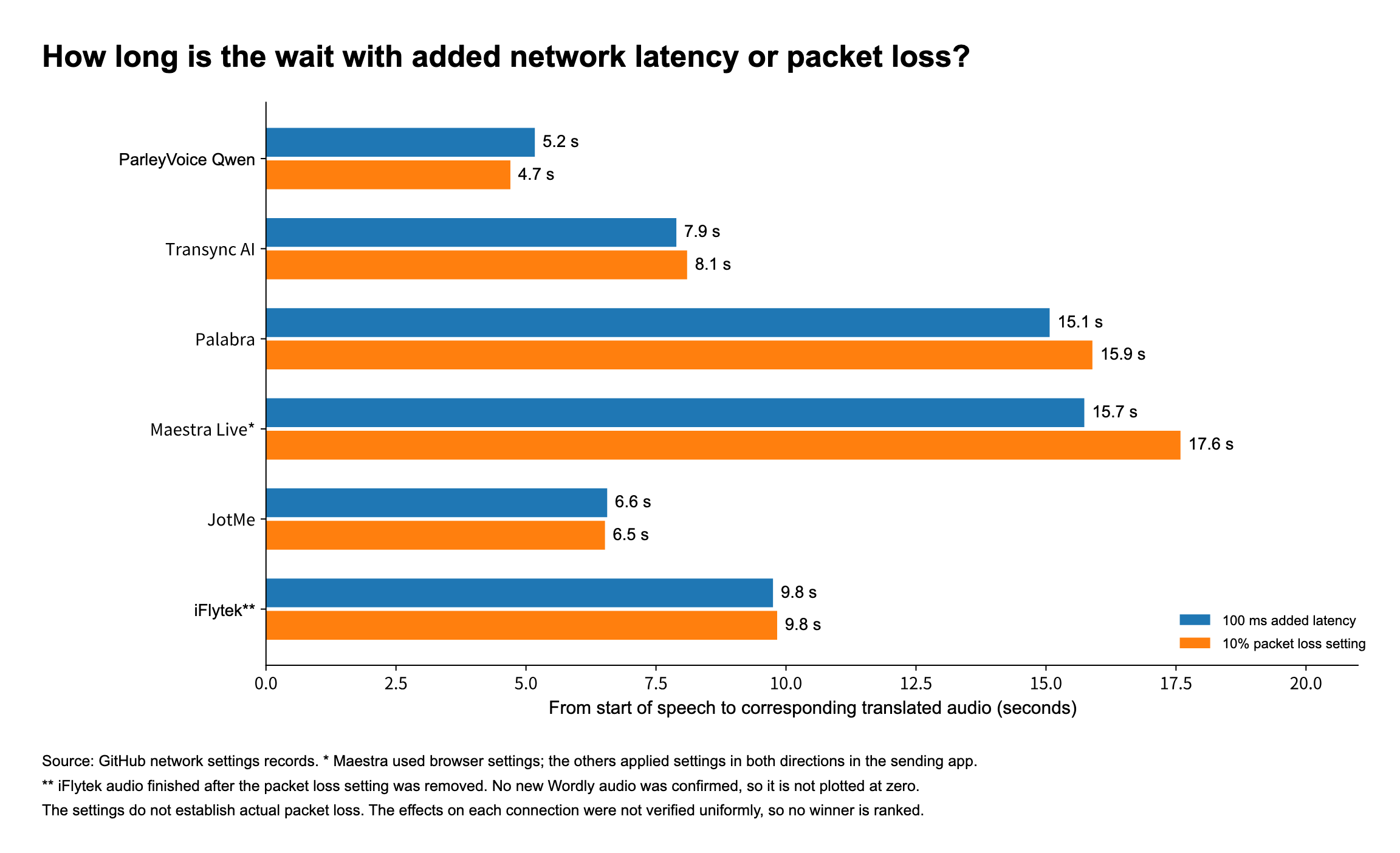
| Tool | Time to translated audio with added latency | Time to translated audio with packet loss | Translation content and caveats |
|---|---|---|---|
| ParleyVoice Qwen Live | About 5.2 s | About 4.7 s | Captions and audio preserved all five facts in both runs; the tool indicated a possible local relay |
| Transync AI | About 7.9 s | About 8.1 s | The complete output in both runs preserved all five facts |
| Palabra | About 15.1 s | About 15.9 s | Captions were complete; the currency in the packet-loss audio has not been confirmed |
| Maestra Live | About 15.7 s | About 17.6 s | Complete output; settings were applied in the browser |
| JotMe | About 6.6 s | About 6.5 s | Still got amounts wrong with added latency; all five facts were correct with packet loss |
| Wordly | No new translated audio confirmed | No new translated audio confirmed | Existing captions left on screen do not count as output from this run |
| iFlytek Simultaneous Interpretation (sender side) | About 9.8 s | About 9.8 s | The final part of the packet-loss audio did not finish playing until the setting was removed |
The application-level settings added 100 ms in each direction or set a 10% probability of packet loss in each direction. Maestra and Wordly used browser-side settings. The values shown by the tools do not mean the actual translation connections necessarily experienced the same latency and packet loss, and the scope of the impact has not been verified on the same basis across products. Full records · Timing data
ParleyVoice Qwen Live still started playing translated audio in about five seconds under both settings, a standout result in this table. These numbers alone, however, are not enough to say which tool is most reliable on a poor connection.
It is also worth checking whether a tool automatically fills in missed material after a disconnection. The ParleyVoice data here comes from a November 11 Qwen Live recording on the Singapore route. Neither the November 12 normal-condition Shanghai retest nor the Mac Doubao short phrases replaced these network tests. After an outage of about 10 seconds, ParleyVoice produced no new output until the original speech was replayed, after which it produced a complete translation. In one Maestra recording, it finished translating the original input after the offline setting was lifted and before the speech was replayed. The former does not count as automatic recovery of missed translation. The latter is a single observation, with too few samples to calculate a recovery success rate. Outage test
4. Voice cloning: Does it still sound like you in another language?
Voice cloning lets a translation retain some characteristics of the original speaker’s voice. Whether a tool offers cloning and whether the clone actually sounds like the speaker are two different questions.
The report used a voiceprint model to compare the original audio with the translated speech. Within the same test group, a higher value means the extracted voice characteristics are more similar. A score of 0.60 does not mean “60% of the original voice was reproduced.”
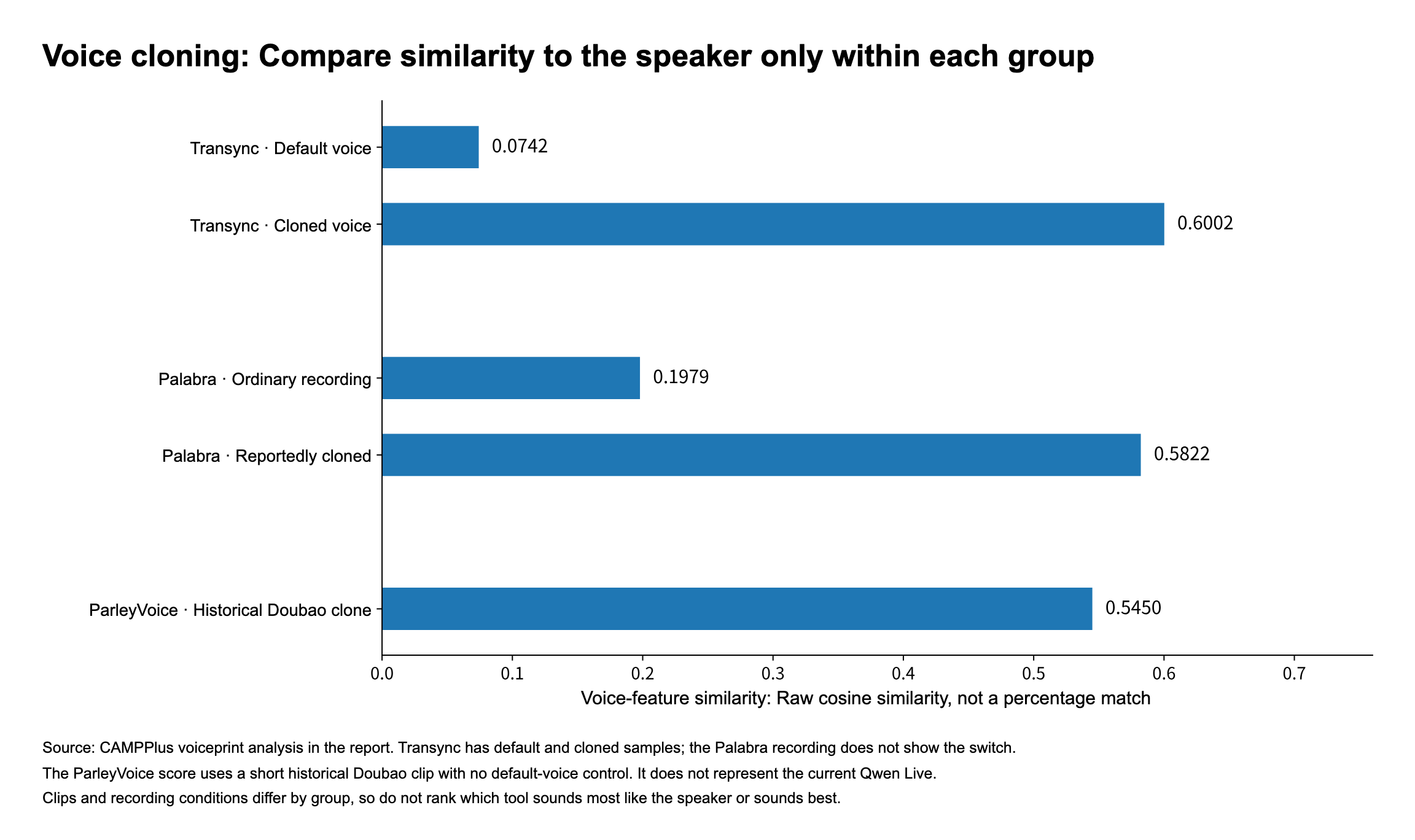
| Tool and sample | Ordinary or default voice | Cloned or reportedly cloned voice |
|---|---|---|
| Transync AI | 0.0742 | 0.6002 |
| Palabra | 0.1979 | 0.5822 |
| ParleyVoice historical Doubao C01 | No comparison sample in the same group | 0.5450 |
Transync has the most complete comparison records in this group. The cloned voice scored 0.6002 and the default voice scored 0.0742, indicating that the voice features in this sample were closer to the speaker’s after cloning. Palabra’s reportedly cloned sample was also closer to the original voice, but the recording did not show the cloning switch. ParleyVoice’s 0.5450 comes from a short clip from the older Doubao C01 cloning run, not from the current Qwen Live or Mac Doubao short-phrase examples. Neither Mac example provides a new voice similarity test. Voice analysis
The recordings and conditions differ between groups. The chart only supports comparison within each group, not a ranking of the three tools. The available material does not include blind listening scores for naturalness or sound quality. When choosing a tool, listen to the actual recordings.
3. Which features matter? Start with what your meeting needs
1. Two-way conversation, self-monitoring, and event sharing
For two people to hold a conversation, the tool needs to translate each person’s speech for the other. If you’re just listening to a course in another language, you may need only one direction. When dozens or hundreds of people are listening to a meeting, they also need a common way to join.
Self-monitoring is useful when you want to hear the translation of your own speech. It plays back the translated voice, not your original voice. ParleyVoice supports this and lets you adjust the monitoring volume separately. Self-monitoring explained
There are two common ways to share audio at an event: let attendees scan a QR code and choose a language, or route the different languages to an on-site mixer or headphone system. Decide which of the two you need before buying; it makes the comparison clearer.
| Tool | Main features for everyday meetings | Text and records | Main approach for larger events |
|---|---|---|---|
| ParleyVoice | Two-way voice, monitoring of your own translated speech, and real-time cloning | Bilingual captions, captions-only mode, local history, and SRT export | Venue routes multiple translated audio streams to specified audio devices |
| Transync AI | Two-way translation, cloning, captions, and meeting summaries | Bilingual floating window, transcription, summaries, terminology, and context | Presentation mode provides a link or QR code; availability depends on the version |
| Palabra | Two-way meetings, cloning, and system integration | Captions, transcription, and terminology | Browser-based listening for meetings and live events |
| Maestra Live | Browser sessions, captions, and audience sharing | Transcription, record exports, and meeting summaries | Shareable link or QR code; languages and attendee counts depend on the plan |
| JotMe | Voice translation, notes, and text translation | Captions, notes, and standalone text translation | Large-screen display, links, QR codes, and more; sharing affects credit usage |
| Wordly | Separate entry points for speakers and attendees | Captions, transcription, summaries, and glossaries | Attendees scan a QR code or open a link to choose a language |
| iFlytek Simultaneous Interpretation | Chinese-language event support and projected captions | Live text corrections and transcript export | Sharing of captions and translated audio |
The table is based on product materials; not every feature was tested individually. Sources: ParleyVoice, Transync, Palabra, Maestra, JotMe, Wordly, and iFlytek.
If you need to monitor your own translation, try ParleyVoice first. For sharing a talk with a multilingual audience, Wordly, Palabra, and Maestra are worth comparing. If you often handle text and organize notes after a meeting, look at JotMe.
As for platforms, ParleyVoice is available for Windows and Mac, and the other party does not need to install the same tool. Transync covers desktop, mobile, and web, but audio connections work differently across platforms. ParleyVoice · Transync
2. What’s the difference between large language models, RTC, and echo cancellation?
The model determines how speech is understood and translated. A common three-stage pipeline recognizes speech as text, translates the text, and then synthesizes audio. ParleyVoice uses large language models such as Qwen Live and Doubao for end-to-end speech translation, bringing speech understanding and generation closer together. Transync also publicly describes an end-to-end speech model. ParleyVoice model architecture · Transync product overview
A three-stage pipeline can also use a large language model at the text translation stage. The label “large language model” alone does not tell you which tool is better. What matters to users is whether the translation is accurate and the wait is short enough.
RTC handles real-time audio transmission. It takes time for audio to reach the server and return to your device, and network fluctuations can also cause delays. In supported hosted meeting modes, ParleyVoice uses RTC and global access nodes, along with optimizations for capture, transmission, and playback. Palabra’s API also supports WebRTC. RTC technology can significantly reduce translation latency and improve performance on poor networks, making translation faster and more stable. ParleyVoice RTC overview · Palabra API
Echo cancellation prevents audio from being picked up again. If the microphone captures translated audio from the speakers, it can cause echo or even translate the translated speech again. This is not the same as removing background noise or preventing duplicate audio capture inside the application.
| Tool | Model architecture | Real-time transmission and echo handling |
|---|---|---|
| ParleyVoice | Qwen Live and Doubao; end-to-end speech translation | Supported hosted modes use RTC and global access nodes; echo handling is documented, but availability depends on the version |
| Transync AI | Officially described as an end-to-end speech AI model | RTC and global media nodes are not clearly documented; Mac release notes mention echo improvements |
| Palabra | The API configures recognition, translation, and speech synthesis separately | The API supports WebRTC/LiveKit and WebSocket; confirm separately how the client uses them |
| Maestra Live | Its guide describes recognition, translation, and speech playback | Explicit browser controls for echo cancellation, noise reduction, and more |
| JotMe | Several modes; specific proprietary models are not disclosed | RTC, global nodes, and a common echo cancellation implementation are not clearly documented |
| Wordly | Recognition, machine translation or LLMs, and speech synthesis | Teams release notes mention echo and noise filtering; RTC is not clearly documented |
| iFlytek Simultaneous Interpretation | The official site links to the Spark simultaneous interpretation model | RTC, global nodes, and product-level echo cancellation are not clearly documented |
“Not clearly documented” means the available material is insufficient, not that the feature is absent. Sources: ParleyVoice models, RTC, echo handling, Transync and its release notes, Palabra, Maestra, JotMe, Wordly and its changelog, and iFlytek.
There is no single winner here. ParleyVoice lists RTC and global access nodes as product capabilities, while Maestra documents a user-accessible echo cancellation switch. The right fit depends on whether the features are available in the version you use and how well they work. When client information is involved, also check how recordings are stored and whether you can delete them. Local caption storage does not mean the translation itself bypasses the cloud. ParleyVoice data practices
4. How many languages are supported? Check spoken output as well as text
“Supports 60 languages” does not necessarily mean the tool can play audio in all 60. Before buying, check which languages it can recognize, which languages it can speak, and whether both parties can hear the language they need.
ParleyVoice’s Qwen mode supports 60 spoken input languages and 29 spoken output languages. For example, it can understand Cantonese but cannot play translated audio in Cantonese. If you need a spoken reply in Cantonese, “supports Cantonese” is not enough. Doubao mode is mainly for Chinese–English translation in both directions. Official language list
| Tool | Spoken input or real-time translation coverage | Languages available for translated audio | What to watch for |
|---|---|---|---|
| ParleyVoice Qwen Live | 60 spoken input languages | 29 spoken output languages | Doubao works both ways between Chinese and English; Qwen supports Cantonese as input only. Language list |
| Transync AI | More than 60 real-time translation languages | More than 40, according to the official voice FAQ | Translation and audio playback cover different sets; check the specific language for voice cloning. Languages · Voice FAQ |
| Palabra | Meeting product page says more than 60 | Supports voice translation, but the meeting page gives no separate output total | The main site says “more than 70”; check the respective lists for input, output, and cloning. Meetings page · Main site · Language documentation |
| Maestra Live | More than 100 languages for live recognition and translation | More than 100, according to the Live meetings page | Some other pages say more than 125; this guide uses the Live meetings figure of more than 100 rather than mixing page totals. Recognition · Meetings page |
| JotMe | Desktop captions/transcription cover more than 200 languages and dialects; Fast detects the input language automatically and has no separate input total | 13 in Fast mode | More than 200 refers to captions and transcription, not Fast voice input or output. Language list · Fast voice |
| Wordly | More than 60 speaker-language options | The official site lists 67 attendee language options for audio and captions | These include regional English variants and Simplified and Traditional Chinese options, so they are not 67 distinct languages. Language list |
| iFlytek Simultaneous Interpretation | The help page lists two-way translation between Chinese and 14 other languages or dialects, for 15 options | The same page lists 15 audio playback options | These include Cantonese, Uyghur, and Tibetan. Floating web captions list four languages separately: Chinese, English, Japanese, and Korean. The list does not establish that all 15 options can be paired with one another. Help page |
These figures come from official materials consulted on November 14, 2026; they are not language-by-language test results. Vendors count dialects, regional variants, and Simplified and Traditional Chinese differently, so the guide retains their definitions rather than turning the numbers into a single ranking.
For spoken interpretation in more languages, check Maestra and Wordly first. If you mainly need captions, JotMe lists wide coverage, but Fast still offers only 13 spoken output languages. ParleyVoice Qwen’s 29 spoken output languages include Chinese, English, Japanese, Korean, French, German, Spanish, Thai, Vietnamese, Malay, and others. Confirm your target language first, then compare latency and cost. That is more useful than choosing the largest number. Maestra · Wordly · JotMe · ParleyVoice
“Supports more than 100 languages” also does not mean you can run more than 100 language channels in the same meeting. Event plans usually limit how many languages can be active at once and how many attendees can join. Check the purchase terms separately. Maestra plan details
5. Cost per hour: Which tool actually costs less?
With usage-based billing, one hour of use means paying for one hour. With a monthly package, you pay the full monthly fee up front. The average price per hour often advertised assumes you use all the included time. If you use only one hour a month, the advertised hourly rate for fully using a ten-hour plan is not your actual bill.
The table uses listed monthly or usage-based prices and excludes annual discounts and free credits. USD and CNY are shown separately. Event services include different things, so they cannot be compared with personal calls on hourly price alone.
| Tool and plan | Cost per hour | Actual purchase terms |
|---|---|---|
| ParleyVoice Qwen | USD 4.20/hour, pay as you go; Doubao: USD 8.88/hour | Top up a wallet; no monthly subscription required. Two-way interpretation in hosted meetings is billed once. |
| Transync AI Personal | About USD 0.90/hour for the international plan if fully used; CNY 3.90/hour for the China plan if fully used | International: USD 8.99/month. China: CNY 39/month. Both include 10 hours, and unused monthly time expires. |
| Palabra Meetings | Starter: USD 20/hour; Pro: USD 15/hour; Team: USD 10/hour, all at full usage | Monthly plans are USD 60 for 3 hours, USD 150 for 10 hours, and USD 500 for 50 hours, respectively. |
| Maestra Meetings | About USD 4.90/hour at 10 hours a month; USD 49/hour if used for only 1 hour | USD 49/user/month. The public plan has no cumulative usage limit, with up to 75 minutes per session and 2 languages. |
| JotMe Premium + Fast voice | About USD 18/voice hour if fully used | USD 30/month. The 500 minutes of credit are consumed at 5×, giving 100 minutes of voice use. Top-ups work out to USD 30/voice hour. |
| Wordly starter package | About USD 150/meeting hour if fully used | About USD 1,500 for 10 hours, generally valid for 12 months. Event size affects the quote. |
| iFlytek Quick Interpretation listed price | CNY 48/hour | Based on the listed CNY 0.8/minute. Check the purchase pages separately for time cards and enterprise plans. |
Pricing uses the verification record from November 13, 2026. Sources: ParleyVoice, Transync international and China, Palabra, Maestra, JotMe plans and credit multiplier, Wordly, and iFlytek. Maestra has several product lines; this comparison uses the Live meetings plan.
What if you use one hour a month? What about ten?
Assuming individual use, no additional event licenses, and no free credits:
| Plan (monthly spend in USD) | 1 hour | 3 hours | 10 hours |
|---|---|---|---|
| ParleyVoice Qwen, pay as you go | 4.20 | 12.60 | 42.00 |
| Transync AI International Personal | 8.99 | 8.99 | 8.99 |
| Maestra Meetings | 49.00 | 49.00 | 49.00 |
Each Maestra meeting must fit within 75 minutes.
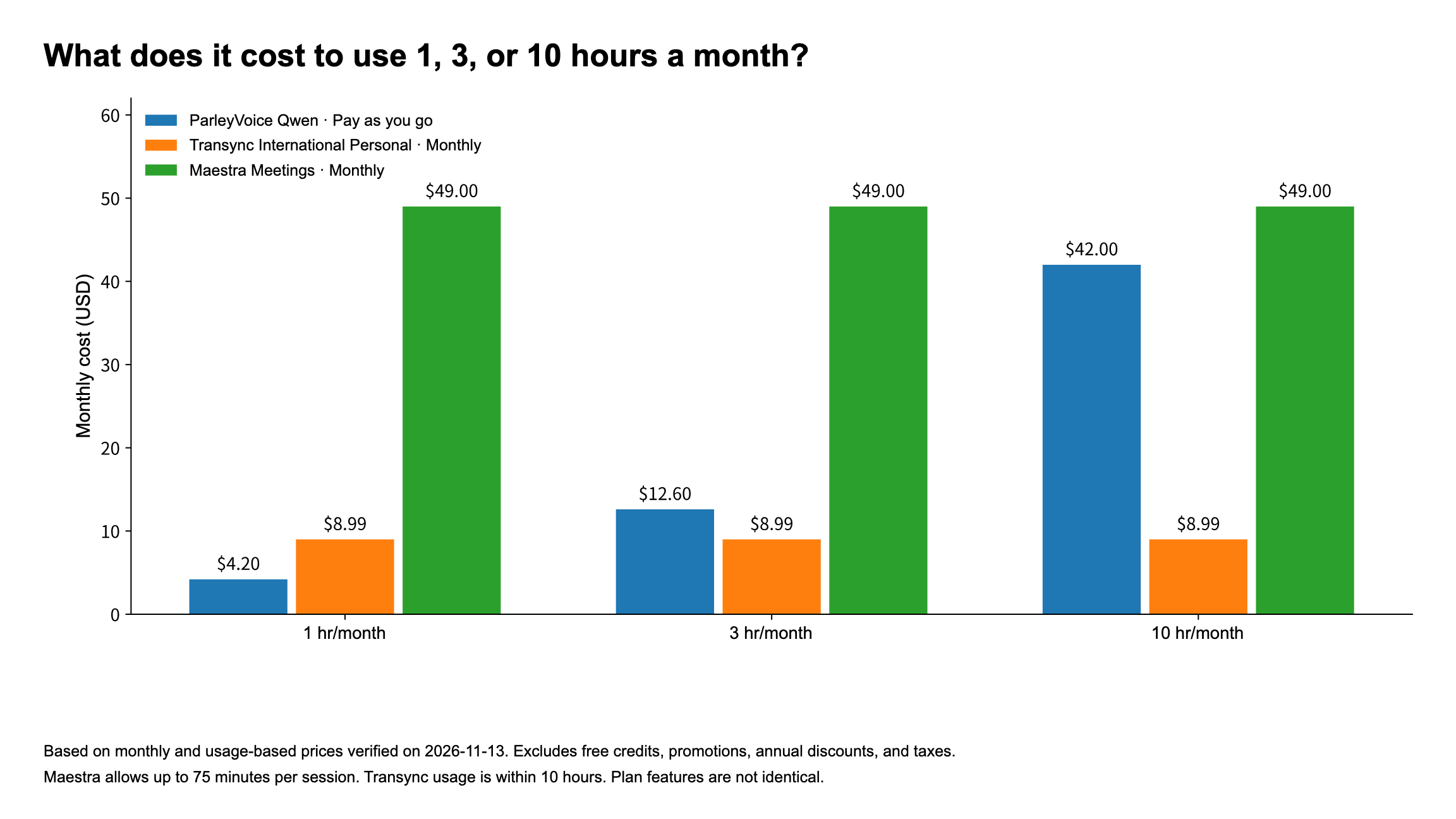
On cost alone, Transync has the edge if you hold many hours of meetings every month. ParleyVoice is more flexible for occasional meetings if you don’t want a monthly subscription. At USD 8.99 per month for Transync International Personal and USD 4.20 per hour for ParleyVoice Qwen, the two cost the same at about 2 hours and 8 minutes a month. Beyond that point, and within Transync’s 10-hour allowance, Transync costs less.
ParleyVoice’s hourly price is lower than the Palabra, JotMe Fast, and Wordly plans listed here. Maestra, however, charges a flat monthly fee, so its effective hourly rate falls with use. At 20 hours a month, USD 49 works out to USD 2.45/hour, less than ParleyVoice Qwen, provided you can work within the per-session time and language limits.
The billing model also affects the bill. ParleyVoice bills for silence while connected, so stop interpreting when you’re done. Its pricing documentation cited here describes per-millisecond billing. Venue requires a separate one-time USD 149 license; bring-your-own-API mode requires a separate USD 95 license plus provider charges. JotMe Fast uses credits at 5× the normal rate, and sharing with multiple people increases usage. Maestra’s USD 19 personal tier allows only 15 minutes per session, so that price cannot directly represent a full one-hour meeting. ParleyVoice · JotMe · Maestra
6. Choose based on what you need
For spoken conversation: ParleyVoice
If you frequently go back and forth with clients or don’t want to watch captions throughout a meeting, our preference is ParleyVoice Qwen Live. In the latest Shanghai retest, translated audio started after about 3.8 seconds on the first run and 5.0 seconds on repeat input. Self-monitoring, two-way interpretation, and real-time voice cloning together suit this type of meeting. Its 60 input and 29 spoken output languages also cover many commonly used languages. Qwen costs USD 4.20 per hour, billed by usage. You can also listen to the Doubao short-phrase examples on Mac and try it with your own meeting material. It is not the cheapest option for consistently heavy usage, but occasional users do not have to buy a monthly plan. Qwen data · Doubao examples · Features · Languages · Pricing
For lower cost: Transync AI
If you use all 10 hours per month, the international personal plan costs about USD 0.90 per hour and the China plan costs CNY 3.90 per hour, a clear price advantage. Before buying, listen for the delay during the first meeting and in subsequent conversation. If the wait is acceptable, the closer your regular monthly usage is to the included hours, the better the deal. Test · International pricing · China pricing
For captions, notes, and post-meeting work: Maestra, JotMe, or Transync
Maestra suits browser sessions and audience sharing; JotMe combines text translation and notes; Transync includes both captions and summaries. If you mostly read text, the wait for audio does not have to be your top priority. Still watch for JotMe’s errors with monetary amounts, and calculate the Fast voice cost separately from its standard text features. Maestra · JotMe · Transync · Test
For a multilingual event: Decide which languages you need and how attendees will listen
If attendees will scan a QR code and select a language themselves, compare Wordly, Palabra, and Maestra on languages, attendance limits, and services. If the venue already has a mixer or headphone system and needs multiple translated audio streams, consider ParleyVoice Venue. For Chinese-language hosts, projected captions, and event support in China, look at iFlytek Simultaneous Interpretation. Wordly · Palabra · Maestra · ParleyVoice · iFlytek
For this type of purchase, first list the actual languages, attendee count, and number of sessions, then ask vendors for quotes against the same requirements. A tool that works well for personal meetings is not necessarily right for managing a large event.
Appendix: How were the tests and star ratings produced?
Test scope and measurement
The formal comparison of seven products uses 47 sets of scenarios and 19 recordings from a pinned GitHub version. The main test environment was Windows, and the direction was Chinese to English. The scenarios were based on the same short passage, with replays and different settings; they were not 47 independent meeting excerpts. Supplementary examples and historical comparisons are not included in those counts. Exact software build numbers were not recorded in full. The report’s “latest version test” refers to the latest recording selected for use. Report
The tests checked when translated audio started playing, when captions appeared, and whether five key facts were preserved. Network settings, recording methods, and session states were not fully standardized, so the figures describe the individual samples, not guaranteed performance across versions and regions. There were no subjective blind listening scores for voice cloning. Method
How the recommendation ratings are calculated
What the ratings apply to
These are editorial recommendations for individuals and small teams holding online voice meetings. They are not an industry standard, a third-party certification, or a user satisfaction survey. The ratings use existing tests and public product information. This review of the sources did not add another round of testing or change any weights or scores.
Translation content and audio wait scores use selected recordings of the fixed Chinese-to-English test material. Supplementary examples and historical comparisons do not count, and timings with an unconfirmed start point are not used to score the wait. Language coverage is listed separately to help readers choose and does not directly affect scores. Product materials can confirm how two-way use works, but not the translation quality in both directions.
Categories and weights
| Category | Weight | Main question |
|---|---|---|
| Translation content | 30 | Were amounts, times, negation, and conditions preserved? |
| Audio wait | 25 | How long after you start speaking do you hear translated audio? |
| Voice features | 20 | Can the tool output translated audio, handle two-way conversation, let you monitor your own translated voice, and clone voices? |
| Cost | 15 | Are the cost and upfront commitment suitable for occasional and frequent users? |
| Text and event capabilities | 10 | How useful are captions, records, text tools, and audience sharing? |
Content accuracy and audio wait account for 55% combined because they are the first issues spoken communication must address. Technical labels such as model names, RTC, and global nodes do not earn points on their own. Their value should show up in usable features or results.
Scoring content, wait time, and voice features
Translation content: Each key fact preserved in the selected representative normal-condition recording earns 6 points, up to 30. Preserving all five only means that recording passed those five checks, not that overall accuracy was 100%. See the main article for ambiguous wording and failures in other runs.
Audio wait: Points are assigned by the time until audio begins in each recording: up to 5 seconds earns 25 points; more than 5 and up to 7 earns 22; more than 7 and up to 10 earns 18; more than 10 and up to 15 earns 12; more than 15 and up to 20 earns 8; and more than 20 earns 3. If the time cannot be confirmed, no value is invented.
Each product uses the two recordings listed below. In the order shown, each original timing is assigned to a band separately, without using the rounded values in the main article. The wait score weights the first recording at 1/3 and the second at 2/3. This is an editorial emphasis on subsequent use, not an estimate of actual usage frequency or an average latency.
| Product | Recordings used | Recorded wait times | Audio wait score |
|---|---|---|---|
| ParleyVoice | N05, N06 | 3.84, 5.04 s | 23 |
| Transync AI, cloning enabled | N01, N02 | 18.25, 6.935 s | 17.3 |
| Palabra | N01, N02 | 14.8136875, 14.929875 s | 12 |
| Maestra Live | N01, N02 | 16.0353125, 17.20 s | 8 |
| JotMe | N01, N02 | 5.1406875, 6.9406875 s | 22 |
| Wordly | B01, B02, unthrottled baseline | 16.046, 15.0863125 s | 8 |
| iFlytek Simultaneous Interpretation | N01, N02 | 9.57, 9.37 s | 18 |
The baseline recordings do not distinguish cold starts from warm starts, and the first-use conditions and session states are not identical across products. The wait scores inform recommendations for this scenario; they are not a performance ranking under identical conditions.
Source: Original timing table. See “Source material and references” in this appendix for the scope and pinned version.
Voice features: Translated audio output, a clearly documented two-way voice workflow, monitoring your own translated speech, and voice cloning each earn 5 points. Only features with clear evidence are scored. Public documentation may be incomplete, so an unscored feature is not necessarily unsupported.
Scoring cost and additional capabilities
Cost and additional capabilities are editorial judgments, not calculated using a uniform formula. The cost score mainly considers the upfront purchase requirement and spending at different usage levels. The additional-capabilities score mainly considers how useful captions, records, text tools, and event sharing are. The scores can be used to check the totals and star conversions, but cannot be derived from official unit prices alone.
| Product | Main cost considerations | Main considerations for additional capabilities |
|---|---|---|
| ParleyVoice | Pay as you go suits occasional use; low-cost subscriptions are better for consistently heavy use | Local caption records and output to audio devices, rather than a QR-code platform for attendees |
| Transync AI | Personal subscription is inexpensive, but you must buy the monthly plan | Captions, summaries, terminology, and presentation sharing |
| Palabra | Meeting packages cost more to get started; higher tiers reduce the hourly rate | Meetings, events, terminology, and system integration |
| Maestra Live | The monthly rate suits ongoing use, but session length and purchase options have limits | Browser captions, records, summaries, and audience sharing |
| JotMe | The Fast multiplier substantially raises voice costs | Text translation, meeting notes, and sharing |
| Wordly | High upfront cost for individuals; large events should not be judged like personal calls | Strong event distribution and organization features |
| iFlytek Simultaneous Interpretation | CNY billing and time cards should be calculated based on the actual purchase | Event support in China, projected captions, live text corrections, and transcripts |
Cost scores use pricing materials verified on November 13, 2026. To compare price alone, use your own usage level and the pricing table in the main article rather than treating overall stars as a price ranking.
Category scores and star conversion for all seven products
| Product | Content (30) | Wait (25) | Voice features (20) | Cost (15) | Additional capabilities (10) | Editorial total | Recommendation rating |
|---|---|---|---|---|---|---|---|
| ParleyVoice | 30 | 23 | 20 | 12 | 6 | 91.0 | 4.5 |
| Transync AI | 30 | 17.3 | 15 | 11 | 8 | 81.3 | 4.0 |
| Palabra | 30 | 12 | 15 | 7 | 8 | 72.0 | 3.5 |
| Maestra Live | 30 | 8 | 10 | 10 | 10 | 68.0 | 3.5 |
| JotMe | 18 | 22 | 15 | 8 | 10 | 73.0 | 3.5 |
| Wordly | 30 | 8 | 5 | 5 | 10 | 58.0 | 3.0 |
| iFlytek Simultaneous Interpretation | 30 | 18 | 5 | 11 | 9 | 73.0 | 3.5 |
The total is the sum of the five category scores. Stars = total ÷ 20, rounded to the nearest 0.5 star. The decimal place in the total makes the addition easier to check; it does not represent measurement precision.
How to read the ratings
The sample is small, uses a single test passage, and was recorded under conditions that were not entirely consistent. The results cannot represent long-term performance. Weights, wait-time bands, and editorial judgments also affect the outcome. Identical star ratings do not mean identical capabilities. Ratings for small voice meetings should not be applied directly to large events, training, or other languages.
When choosing, look at your use case, the relevant test results, and your actual costs before consulting the overall rating. Before an important meeting, try saying a passage with a customer’s name, a product model, an amount, and a delivery date. Ask the other person what they actually heard, then check what you were charged.
How language coverage was counted
The figures in “How many languages are supported?” come from official materials retained on November 14, 2026, not tests of each language. Recognition, translation, and audio options are reported using each vendor’s definitions. Dialects, regional variants, and Simplified and Traditional Chinese are not all treated as distinct languages for comparison. These points are easy to misread:
- ParleyVoice, Transync AI, and Palabra: Cantonese is input-only in Qwen, while Doubao is two-way between Chinese and English. Transync’s spoken output count comes from the voice FAQ, not the real-time translation total. Palabra uses the figures on its meetings page; check the recognition, translation, and cloning lists separately. ParleyVoice language list · Transync voice FAQ · Palabra language documentation
- Maestra Live, JotMe, and Wordly: Maestra uses its Live meetings page, not “more than 125” from other pages. JotMe does not specify a separate Fast input total, so desktop captioning and transcription coverage cannot substitute for it. Wordly’s figures are counts of options, including regional and writing-system variants. Maestra Live meetings page · JotMe Fast voice guide · Wordly language list
- iFlytek Simultaneous Interpretation: The count uses the help page’s feature list, not the nine languages in the older pricing table on the same page. The 15 options are Chinese, English, Japanese, Korean, French, German, Russian, Spanish, Italian, Arabic, Thai, Vietnamese, Cantonese, Uyghur, and Tibetan. The list does not mean any two options can be paired for translation. iFlytek help page
Source material and references
- Formal comparison: The full report includes findings and recording links for each tool. Results by run preserve the translations and assessments. The timing data record the source audio start and elapsed times, and the reproduction notes explain what can be recalculated.
- Recordings: The public videos are redacted viewing copies and cannot replace the originals for measurements at the same precision.
- Product materials: Official sources for features, costs, and languages are linked in the relevant sections. Pricing uses the November 13, 2026 verification record. Confirm current plans and your target languages before purchasing.
The benchmark references are pinned to commit 00bf33d187cf9fbd8a128f7324f6c51b859f3b0c (November 17, 2026) so readers can check the same version of the records.