Live translation. Right on your desktop.

Live voice translation.
In both directions.

Speak your language in online meetings. Hear the other side in yours. Parley translates voice in both directions, with bilingual captions on your Windows or Mac desktop.

See pricing →

Your computer. Your headphones. No recurring Parley subscription.
Desktop preview · Check availability before buying

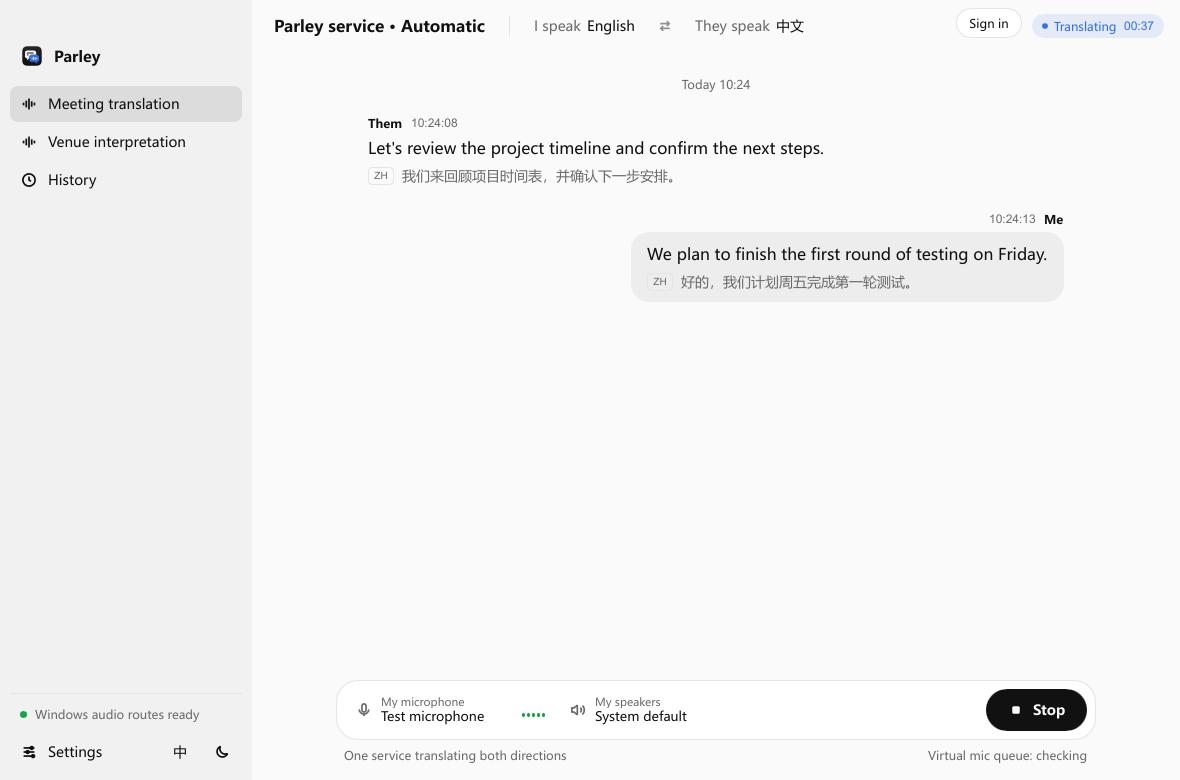
Parley desktopMeeting translation
Parley desktop showing an English and Chinese conversation with translated captions
App screenshot · sample conversation
You speak. They understand.Two directions. One natural flow.
No dedicated translation earbuds.

Use your computer, microphone and headphones. Meeting audio setup is required.

Pay as you go. Or bring your API.

Use managed translation by the stream-minute, or buy the personal API licence and pay your provider separately.

Hear it. Read it. Keep it.

Translated speech, bilingual captions, local history and SRT export in one app.

Stay with the idea.
We’ll help with
the language.

Good conversations shouldn’t stop at a language barrier. Parley brings translated voice and the original words into the same place, so you can keep listening, contributing, and moving forward.

01 / Hear it

Translation you can listen to.

Translated speech plays through your chosen audio output.

02 / Read it

Both sides of every sentence.

Follow the original words and the translation together.

03 / Keep it

The conversation stays with you.

Review local caption history and export an SRT file.

Made for the way you work

Ready. Talk. Keep going.

01

A little setup.
A lot less friction.

Choose your languages, audio devices, and translation service. Use Parley’s managed service, or connect your own API after unlocking the personal API licence.
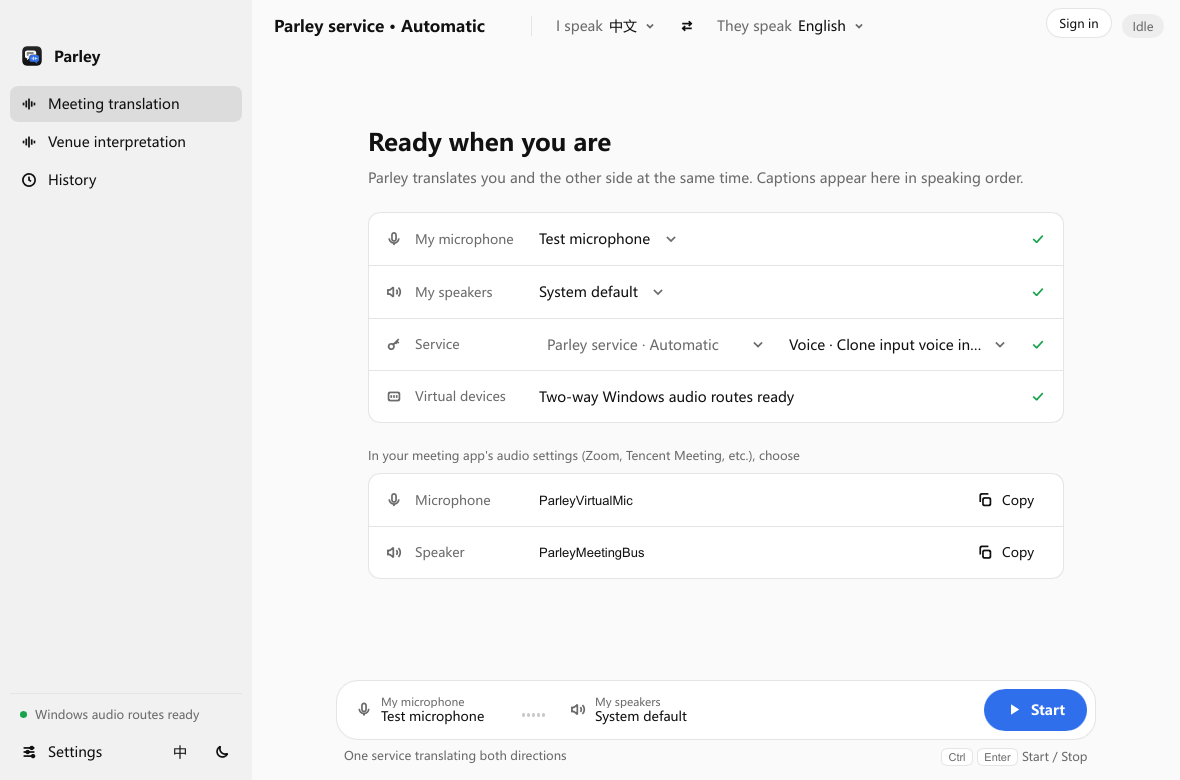
Parley preparation screen with microphone, output, service and meeting audio settings
Actual desktop interface · sample device settings
02

Less guessing.
More conversation.

Speak in your own language and follow what’s said in theirs. Original and translated captions appear together, while translated voice reaches your selected output.

English and Chinese captions from both sides of a Parley meeting
Actual desktop interface · sample conversation
03

When the call ends,
the context stays.

Revisit the full caption history, including the original words and translations. Export an SRT file when you want to take the conversation further.

Parley history screen displaying a saved bilingual meeting and subtitle export controls
Actual desktop interface · sample history

The words. And what they mean.

Two languages.
Shared understanding.

Keep the original close. Bilingual captions let you follow the translation without losing sight of what was said.

Original · English

Let’s turn a good conversation into a great next step.

Translation · Chinese

让一次精彩的交流,成为下一步行动的起点。

Illustrative bilingual caption

Where people meet

More room for
what you have to say.

01 / Teams

A shared plan,
across time zones.

Stay in the conversation with international teammates. Follow the details, ask a question, and decide what comes next.

02 / Customers

Hear the person
behind the request.

Make space for clearer exchanges with clients and partners, with the original words and translated captions side by side.

03 / In person

Ideas that travel
around the room.

Bring translated voice to presentations and face-to-face conversations using a microphone and physical audio output.

Thoughtful tools. One desktop app.

Everything around
the conversation.

Live captions

Two sides. One clear view.

Read the conversation in speaking order, with the original and translation together.

Parley live bilingual caption interface

A voice that fits.

Choose the built-in voices available for your service and model, or a supported personal voice.

Audio, connected.

Set microphone, meeting audio, and playback devices for the direction you need.

Local caption history

Come back to
the important bits.

Revisit a full conversation and export SRT subtitles.

Parley saved caption history interface

A dedicated
in-person flow.

Go straight from a microphone to translated voice on a physical speaker or headphones.

A choice of AI services

Your conversation.
Your way to connect.

Start with Parley’s managed service. Or unlock the personal API licence and connect a supported provider with your own credentials.

Languages and voice options depend on the selected model.

Flexible by design

Translation when you need it.
A payment model that fits.

For occasional calls and a simpler start

Pay as you go.

Sign in and use prepaid credit. No personal API key, no software licence purchase and no recurring Parley subscription required for managed translation.

Each active audio stream is timed separately. A two-way meeting can use two streams; in-person interpretation uses one.

Estimate your next conversation →

For control over your provider

Buy once. Bring your API.

A one-time personal API licence unlocks supported provider and model configuration. Choose a Qwen, Doubao, OpenAI or Gemini adapter in the app.

Provider usage is billed separately. The licence does not include translation credits or add to your Parley wallet.

See the current licence price →
Translation earbuds, subscriptions or Parley? Compare the trade-offs →

Before your first conversation

Clear answers.
A better starting point.

What does Parley actually translate?

In meeting mode, Parley translates your microphone into speech for the other person and their meeting audio into speech for you. In-person mode translates one microphone into one language on a speaker or headphones. Both include bilingual captions.

Do I need special earbuds or a meeting subscription?

You can use your existing audio equipment and a Windows or Mac computer. Sending translated voice into a meeting requires virtual audio routing. Parley managed translation has no recurring Parley subscription; your meeting app and any third-party audio tools have their own requirements.

Can I download it and start now?

Installers are available for Windows 11 x64 and macOS 14.5 or later, with separate Intel and Apple Silicon Mac downloads. Visit the download and setup guide for requirements and release details, and confirm your audio setup before purchasing.

Does buying the licence include unlimited translation?

No. The one-time licence unlocks personal API configuration. You pay your provider for its usage. Managed-service wallet credit is separate. See pricing and the stream-minute estimator.

Which languages can I use?

The language pair must be available in your installed app, selected model, mode and voice. Input and spoken-output support can differ. The model reference describes provider capabilities, not universal app validation.

Does my audio stay on my computer?

Selected capture audio is sent to your cloud translation service. Caption history is stored locally. The website’s caption example uses preset text. Read the audio and data handling overview.

Let’s keep talking.

Your next conversation,
with fewer barriers.

Check your desktop setup, then choose how you want to pay.

Windows & macOS · Desktop development preview